Sign In | Create Your Account | Site Map  

Fox TALAS 36 RC2 Review

Tuesday, July 14th, 2009

picture-240

The Fox Talas 36 RC2 fork is just the ticket for those who like to travel through the air with the greatest of ease while avoiding going splat upon landing. Fox has revamped its entire product line for 2010 and I just had to try the latest arrival: the Fox TALAS 36 RC2 (now with FIT damper). This fork is impressively stout, more adjustable than a NASCAR, and lightweight for its class (less than five pounds). How did Fox manage to cram so many features into such a lightweight package? Well, for starters the new FIT damper reduces the amount of oil required which in turn reduces the fork’s weight. FIT technology also eliminates the chance of oil aeration (turning from fluid to foam) which translates into better control throughout your ride.

Installation

Seeing that this fork is not cheap, do not attempt to install this one unless you have all the tools handy and are competent enough for the task. Let’s face it: when a bike part costs more than a thousand dollars it’s not something you want to make a mistake on unless you’re Donald Trump (and I’m guessing he doesn’t do his own MTB work). Now, having said that, once the steering tube and star nut are installed, the rest of the installation is actually a snap. Just make sure you have enough brake hose for full travel and the correct amount of load on the quick release skewers at the axle.  Always follow the recommendations on the included interactive installation CD when setting the sag and use the table provided by Fox to set the correct pressure for your weight. Above all, remember to weigh yourself in full gear with water, otherwise you will be off and will need to add more pressure later.

Before setting up this fork I strongly recommend riding around a parking lot or on the street while jouncing the fork for a while to get all the fluids where they need to be.  This one step I never skip - and keep in mind the “showroom push down” doesn’t cut it.

Setup

After bouncing around for a bit to get all the fluids well circulated I got down to business setting up my fork. The TALAS has four settings: air pressure (spring rate), low speed compression, rebound, and high speed compression. The images below show the controls for the TALAS  rebound, high speed and low speed compression and finally the height control.

picture-86picture-88picture-87

Sag is controlled via air pressure and is the first thing that needs to be set. Just follow the included CD instructions on selecting a starting pressure and you should be well within the ball park. This fork allows you to roll with either 100, 130, or 160mm of travel so I chose to use the fork’s full 160mm length for my sag measurement. Fox recommends a 20% sag which translates into 32mm at a 160mm length.

Low speed compression is set using the small blue knob and stacked dials on the right fork leg (they are covered with a black screw cap). When setting the low speed compression you’re looking for the point where you can hit the brakes or accelerate without having the bike pitch excessively. Ride hard and hit the brakes, noting how much the bike pitches forward. You don’t want too much movement but at the same time you don’t want the fork to stay rigid. Ultimately you need the fork to follow the trail and thankfully this setting can be tweaked both on and off the trail.

Rebound is the next setting to manipulate and you also can do this one the trail. Here you’re looking for a controlled return to ride height after the fork compresses. You don’t want the fork to feel like it’s tossing you off the bike on return (too little rebound) nor do you want the fork to come up so fast that it feels like the fork is losing travel over multiple bumps (too much rebound).

For me the high speed compression (big blue knob) setting was a bit more challenging and I ended up using more of a “seat of the pants” approach to get it dialed in. Most riders will probably only need to set this once after finding a satisfactory amount of control but those who live and breathe traveling through the air will probably want to play with this setting more often. Adjust your high speed compression setting so the fork doesn’t blow through its entire travel too quickly when taking a big hit. Keep adding damping until you have a controlled fork compression without the fork eating up all its travel and bottoming out (stopping abruptly in its internal bump stop). You will know you have too much high speed compression when you feel your wrists compress and an uncomfortable amount of force travels through your body on impact.

picture-245

On the trails with the TALAS 36

On rutted, rooty trails the fork followed the trail as if my tire was glued to the ground.  During my test rides there was never an instant when I felt the fork lose control over the front wheel. Granted, I was using a fairly lightweight but strong wheel set-up (Eskar S-works 2.3 and Sun-Ringle STR8 Track wheels), but clearly the fork took control and managed the wheel nicely over rutted braking areas without a single complaint.

Flying over larger jumps, drop downs, and waterfall rock gardens I felt very confident and in full control of the bike. The 160mm fork with its 36mm stanchions and the 20mm quick-release really kept everything aligned upon landing and soaked up jumps as if they were just bumps. Nailing every jump without having the front end want to bury itself in the dirt or push me off the bars was just fantastic. I love a fork that can do that!

Climbing with the TALAS is what I really liked because I could go from 160mm to 130mm to 100mm in just two clicks without having to remove a glove. This feature is a must for those who intend to toss this fork on an all-mountain or trail rig. At 160mm travel, climbing can be a bit tough and yes the steering will wander a touch (put a wider bar on and this is a non-issue). But turn the travel down to 130mm or even 100mm and you’ll have a steeper head angle and your weight will be better distributed over the bars - now you’re climbing with the rest of the group. Now don’t get me wrong, I’m not saying you will be as efficient as your buddy on his XC rig, but at least you can keep up!

picture-248

Descending with this fork on a few ski runs at Blue Mountain, ON was ridiculously fun - I just cranked the fork up to its full travel (160mm) and went. At speed with this fork I felt like I was on rails with the added comfort of total control when landing jumps. I also found I didn’t need to add steering corrections when I hit patches of rocks or roots. Going fast and flying over doubles is what this fork lives to do.

Final notes on the TALAS

This fork rocks and Fox gives you everything you could possibly want in a lightweight, neat package. Not only do you get a highly capable fork that is very light for its size and travel but you also get a fork that can be dialed in precisely for any riding style. Overall this is a great buy so give your LBS a shout to see if you can get a test ride on a Fox TALAS 36 RC2 - I’m betting you won’t be disappointed. Just don’t let sticker shock deter you - in mountain biking you almost always get what you pay for!

Cheers

How I Rate the Fox TALAS 36 RC2

Tracking and steering 9
Rebound control 9
Compression control 10
Construction and quality 10
Trail worthy 1 For light XC, 10 For extreme FR/DH 9
Overall performance quality out of 10 9.5

picture-246

Specifications from Fox:
WEIGHT (1 1/8″ steerer): 4.99 lbs (2.26 kg)
WEIGHT (1.5″ straight steerer): 4.90 lbs (2.22 kg)
WEIGHT (1.5″ taper steerer): 4.95 lbs (2.25 kg)
TRAVEL: 6.3 inches (160 mm) TALAS travel adjust 160-130-100
ADJUSTMENTS: Low speed compression, High speed compression, Travel (160-130-100mm), Air spring pressure, Rebound
LOWER LEG: 20QR thru-axle system; post-style disc brake mounting
STEERER: Standard: 1 1/8″, Optional: 1.5″ or 1.5″ Taper
SPRING: Air
FORK COLOR: Titanium
INTENDED USE: DH, FR, AM

Just a quick thanks to the good folks at Fox Racing Shox’s for the TALAS fork and Opus Bikes for their great bikes that they produce.

How to Install a Front Fork

Monday, June 22nd, 2009

picture-44

Pretty much the biggest upgrade you can give your mountain bike is a new fork but the installation can seem daunting even to experienced MTB tinkerers. If you’ve been considering a fork upgrade but aren’t sure where to start, you’re in luck: here is the step by step procedure that nearly all shops will use to successfully replace your MTB fork. Once you get good at the procedure you could easily do this task in about 35 minutes but for the first time, allot yourself a good hour and a bit. No need to rush this job -the more care you take the better results you will have.

Read your manufacturer’s instructions

The very first thing anyone should do is read the installation instructions. I don’t care if you are an experienced mechanic or a bike tech, there is always something in there that you may not have know or forgotten, and funny thing it is usually the most important piece of information that you need.

Gathering  all the Tools

To do this job you need to round up a few items and tools:

Bike stand
Shop rags (to clean up remove excessive grease)
Allen sockets 3, 4, 5, 6mm (for use with your torque wrench)
Allen keys 3, 4, 5, 6mm
Side cutter (for removing old tie straps)
Soft face hammer
Chisel / standard screwdriver or crown race puller (Park tool #CRP-1)
Tape measure or ruler
Hack saw
Half round file with holder
Pipe cutter with new blade
Threadless saw guide (Park tool #SG-6 or similar)
Threadless nut installer (Park tool #TNS-1 or similar)
Tube that will fit over the steering tube and install the lower crown race
Torque wrench
Shock pump (high pressure up to 250psi)

You may need a new brake adapter if you are changing a fork that had IS (International Standard) mounts to one with post mounts but if your forks use the same mounting system you won’t need an adapter.

Warnings

This is IMPORTANT: If you do not feel you can do this, then don’t. Steering tubes are generally not replaceable so if you cut yours too short, then you’re outta luck. As always, MEASURE TWICE, CUT ONCE! When in doubt, read the last sentence again.  When cutting you should wear safety glasses and you should never use a file without a handle. Be careful not to nick the side of the steering tube with any sharp object.

Removing front wheel and top cap
picture-120

The very first step is to remove the front wheel. Next, release the top cap, take it off, and put it aside in a container so you don’t loose the bolt and cap.

Removing the front brake

picture-121

Most bikes today use post mount brakes and in this case, it’s a simple matter of removing the two bolts that secure the caliper onto the fork. If you have an IS adapter, (International Standard) remove the brake from that point. Make sure all the hardware is placed in a small plastic bag (these use different bolts and should be kept separate).

Removing Brake Hose

Most bikes have the brake hose attached to it in one of two ways: a small plastic mount or a plastic tie wrap. If your fork uses a tie wrap, carefully cut it off, avoiding touching your brake line. Otherwise, simply remove the hex bolt that holds the clip in place and move the brake hose and caliper away. Under no circumstances should you be removing the brake line from the caliper.

Removing Stem Assembly

Use the series of photos below for the following instructions.

picture-123picture-122picture-124

With one hand on the lower crown, hold the fork in position while loosening the stem bolts. The moment the bolts are loosened the fork will fall so better to be safe than sorry! Once you have released the bolts enough, remove the stem and bar as an assembly and allow it to sit on one side of the bike. Afterward, remove the spacers and top crown race and place them somewhere safe.

Remove fork

picture-45

Once you have removed the fork you’ll find the lower bearing race and seal which you’ll need to remove so pay attention to the orientation of the bearing. Your bearing may not look like the one in the picture (this is what is called a cartridge bearing) but bearings won’t stray too far from this design. Keep in mind cartridge bearings are packed with grease so check to see how smooth they are moving (twist them and feel for grittiness, the smoother the better). If your bearings are rough you may want to consider a new headset at this time.

Remove lower crown race

picture-47

If you plan on reusing your old headset you’ll need to remove the lower race; otherwise, skip this step. There are a two ways that you can remove the lower race: use Park Tools CRP-1 OR if you are careful enough you can use a sharp chisel or a screw driver and gently tap the race off by working around ring, removing it evenly. Just be careful not to hit the steering tube! Wedge the tool between the fork crown and race, prying it upward until it pops off. Once off, put the race with the other parts of the headset.

Measuring Steering Tube Length

picture-135Measure the existing steering tube from the mounting face of the crown to the end of the steering tube (you may want to record that number). Next mark the new steering tube with a felt marker.

If you’re placing a new headset and it is not the same as the one that came off, you’ll need to use another method to figure out the steering length. To do that, first measure the head tube of the bike, then check the manufacturer’s info for the stack height of the headset plus the spacers and the thickness of the stem. Add it all up and with that total number subtract 2mm and that should be the length that you need to cut.

Head tube length  +
Headset stack height  +
Spacer stack  +
Stem thickness  +

Subtract 2mm from that total (this is for the top cap clearance and space required to preload the bearings).

Mark and cut the fork

picture-136With the correct length marked on your fork you now have two options for cutting the fork. The first method is to use a threadless saw guide and a hack saw. Set your guide so that when the blade draws over your mark it sits just above the cut line - this ensures that the tube extension doesn’t get cut to short. Ease up on the last few strokes before cutting through - this will prevent a large burr from forming at the end that will have to be filed clean. Finally, carefully remove the saw marks off the top and file the edge at a 45 degree angle to ensure there is no burr or edge that can scratch you or components on installation.

The second method involves the use of a pipe cutter with a fresh blade (shown above). Just make sure to line up your pipe cutter just above the cut line and rotate evenly to get a clean cut.

Installing the star nut

picture-142This step really is really best accomplished using a star nut setting tool, though you could try to install it by other means (you will have a very hard time doing so). Screw the star nut onto the nut setting tool all the way, then line up the star nut with the steering tube (do your best at lining things up here otherwise you will have issues later). Tap the star nut in to place and make sure you set it in a minimum of 5mm. Some tools have a stop that will set the nut in the right way every time.

Install the lower bearing race

picture-144

Once the star nut is installed it’s time to install the lower bearing race. You can go and purchase the correct tool from a tool manufacturer such as Park or find yourself a tube that fits over the steering tube.  I fashioned the tube shown here myself and included a small nylon ring to protect the bearing race. Carefully tap the bearing ring in place and make sure the race sits squarely on the fork crown.

Install fork

picture-146picture-1451

Once the lower bearing race is installed you can go ahead and replace the fork. Remember to replace the lower bearing and seal, then install the fork. Next, install the upper bearing, keeping in mind the orientation of the bearing, then install the compression ring (make sure flat side up) and the top cover. If you plan on using spacers below the stem, install them now followed by the stem itself. You should end up with 2- 3mm of space. Finally you can replace the top cap and stem bolt. Do not torque anything yet.

Install the front brake and cable

picture-147

At this point you should be ready to install the front brake. When you have the brake loosely installed, make sure you’re using the correct bolt length (there should be 8 threads exposed past the caliper). Replace the front wheel with disk, being careful not to jam your rotor into the pads. Once the front wheel is correctly installed now you can set the caliper in place. The way I usually set up the brake is to slowly compress the brake lever, keeping the caliper as centered as possible when applying brake pressure. Slowly tighten the bolts down. Release the brake and spin the wheel while listening to make sure that the pads are not contacting the rotor. You may need to re-adjust the brake by loosening the bolts slightly and carefully moving the caliper until you don’t hear it rubbing when spinning the wheel. DO NOT stick your fingers near the rotor while in motion.

Once you are satisfied with the performance of the front brake, apply brake pressure again and torque the caliper bolts to the amount recommended by both the brake and fork manufacturers. If the fork you are installing states a lower torque value, use that one.  The final job is to keep the cable from rubbing on any moving parts. Some forks come with a convenient mounting point, others require a tie wrap.

Now it’s finally time to line up the wheel with the stem and bars. Stand in front of your bike and hold the wheel between your legs. With your hands grab the bars and wiggle them side to side, slowly centering the bars. Once set you can tighten the stem bolts a bit.

Now, double check to see if the bar is straight. Grab the front brake and rock the bike fore and aft while listening and feeling for a light clunk. If the front clunks you may have insufficient pre-load on the stem top cap in which case you’ll need to loosen the two stem bolts slightly and give the top cap bolt a half turn. Keep doing this until the clunk disappears. If the steering suddenly gets too stiff, you went too far on the top cap tension. Once you have the correct tension, line it up and now torque the stem bolts (use the correct torque from the stem manufacturer).

Now - you’re done! You did it!

Cheers.

Just a quick thanks to the folks at Manitou,Hayes and Opus for their support.

Manitou Minute Elite TPC 140mm, 20mm axle

Wednesday, June 17th, 2009

picture-131

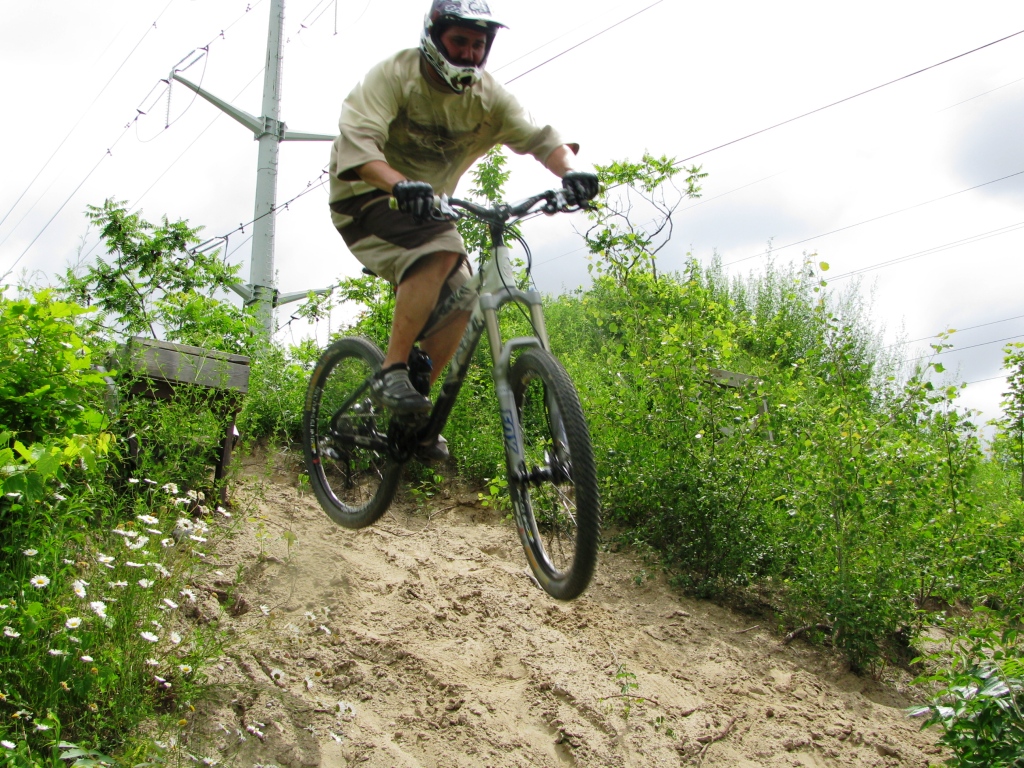
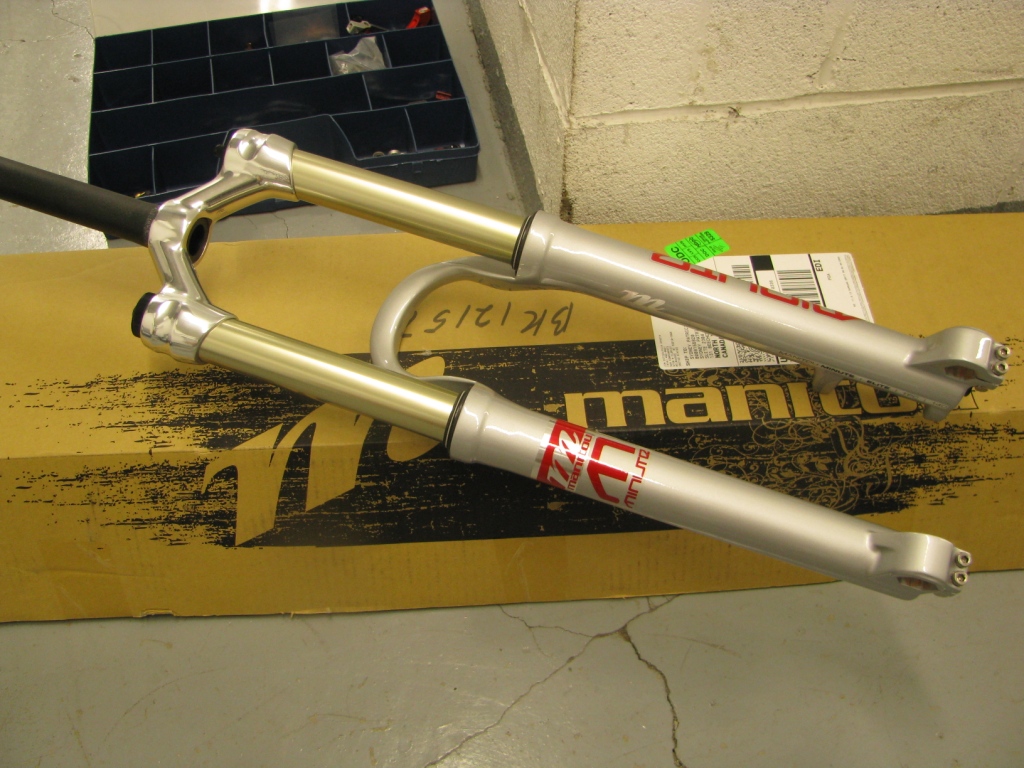
Well folks here I am, back at it again. I’ve been spending some time lately checking out what Manitou has to offer in the all mountain/ XC categories of forks. The biggest thing I have to say about the Manitou Minute Elite TPC (MSRP $650.00), is WOW - what an awesome fork right out of the box! No mods are necessary for this one, just a few pumps on the high pressure shock pump to get the correct sag and this fork was hauling up slopes, ripping the trail apart, and soaking up 6 foot drops like they were curb hops.

To help me evaluate the performance of MTB products, I’ve found it best to change just one part at any given time and to use the same test course for consistency. Once again, the course that I chose for my test of the Manitou Elite TPC was Kelso Conservation Area. The course offers singletrack, rock gardens, high G turns, and drops up to 10′. Kelso is also a stop on the DH circuit here in Canada which makes it the perfect setting to thrash this fork.

Installation

First up, I removed my old fork unit, making sure to remove the bottom crown race from the old damper with care. I then measured the steering tube twice to get the correct length and then marked the Minute with a fine felt marker. After measuring a third time I finally cut the steering tube to the correct length using a very sharp pipe cutter. You could go out and purchase a specialized tool such as the SG-6 from Park or you could use a hack saw with a fresh blade in a pinch. Either way is correct, just be sure to finish the job by removing any burrs.  Also, don’t forget to install a fresh star nut (use a nut setter such as the TNS-1) and finally place the fork on the bike (look for a more detailed post on the procedure coming soon). The whole process took me about 35 minutes and after installing the 20mm axle and brake I was good to go.

Setup

A quick ride revealed that I needed to add a bit more pressure in the fork (too much sag). For those who don’t know, sag is the fork compression you get when sitting still on the bike, hands on bars. I set the compression to mid-way from full left and set the rebound to mid-way as well - with the Manitou Minute the ideal sag is about 25%. Whenever setting the sag on the fork it’s a good idea to have the gear and water you will ride with on you, otherwise you will be off. On my first ride I also had to change the compression and rebound settings to compensate for the slight bobbing I got on extended climbs. This particular model is not equipped with a lock out.

Compression

Riding around finding drops and doubles can be exhausting but luckily Kelso makes it all accessible. Right away I found the Minute features plush, smooth control of the fork through it’s entire travel with a bit of ramping (increase in air spring rate) and the end of its stroke. What you get is a fork that is predicable when going off drops and controllable without coming to a dead stop when you touch down. Hitting rock gardens was equally as fun - the fork went through them with no issues, taking each bump equally well.

If you remain seated in your saddle when climbing the levels set with the control knobs will more than compensate for the pedaling forces you generate and will keep you from losing energy. Now with a fork like this, there will be some movement when pedaling but certainly not enough to annoy you. Using the compression knob you can dial out most of the slow shaft speeds that are associated with this, just don’t dial out too much. The great thing about the Minute is its ability to maintain ground control when climbing and braking.  Once you dial in the right settings you’ll want the fork to set about a half inch while under braking but no more than that.  One reason this fork offers such great control is that it produces very little static friction.

Rebound

The rebound circuit on the Minute will control the behavior of the fork when it is returning back to its ride height. Use the control located on the bottom of the fork to control how quickly the fork returns after compression. You know when you’ve got this right when the fork comes back controlled, without wanting to toss you off the bike. Luckily the rebound circuit on this fork works very well once set. Going through rough terrain and watching the fork follow the trail smoothly without beating on my wrists was a definite indicator to me that the rebound and compression circuits are working well.

picture-132

Overall Impressions

The Manitou Minute Elite is one of those forks that, once you spend the time setting it up correctly, you’d be hard pressed to find another fork that performs as well in the same category. I was very impressed with the fork’s performance, particularly its ability to take both large hits (up to 6 foot drops) and rock gardens. I don’t think I’ve ever ridden a fork that inspired as much confidence as this one has, especially in the 140mm class. The fork always felt smooth, tracked extremely well, and kept me in control. Under braking and climbing the fork maintained wheel contact and never felt like it was blowing through its travel.

The only thing I *might* change on the Minute Elite TPC is the hex bolt through axle configuration. Even though it is very stiff and strong with no chance of damaging the fork, a tool free version would be a welcome addition.

Manitou Specifications:

Damping: TPC
Adjustments: Compression, rebound, preload
Spring: MARS Air
Stanchions: 32mm, Aluminum
Casting: One piece Reverse Arch™ Magnesium
Steerer: Aluminum 1 1/8″
Crown: Hollow Crown™
Wheel Size: 26″

For those of you who like a more objective rating system, here’s how I rate the Manitou Minute Elite TPC on a 10-point scale:

  • Tracking and steering                                                           9
  • Rebound control                                                                    8
  • Compression control                                                             8
  • Construction and quality                                                      8
  • Trail worthy (1 for light XC, 10 for extreme FR/DH)     7
  • Overall performance & quality                               8.5

I also received a press release on Manitou’s latest damper unit that will be available on the 2010 year models and can be added to existing 2007  R7, Minute, and Drake forks. The unit is called the Absolute + and it allows you to more finely tune your fork. The Low and High speed compression circuits can be tuned independently from one another plus the unit includes a lockout feature. Manitou will also be releasing a lockout lever called the MILO which will be available in a right hand version only.

So stay tuned - who says you can’t make a great fork even better?

Just a quick thanks to the folks at Manitou for the chance to review their product. Oh yeah - and be sure to check out the new Manitou website - it’s updated with all the new forks as well as a wealth of information for all their stuff.


Site Map | Advertise | Partners | Contact Us | Terms | Privacy
Camping | Hiking | Trail Running | Mountain Biking
Copyright 2009 Blue Spruce Ventures LLC | Atlanta, GA
singletracks.com is yet another slick Review App