singletracks is mountain biking
Sign In | Create Your Account | Site Map | Help  


Singletracks Mountain Bike Blog

Banshee AMP DJ Bike Build

January 27th, 2012

Over the Christmas break I had a chance to put together a new DJ bike after retiring my older Opus. This year I decided to go with the Banshee AMP after a great season of riding the Banshee Legend. Calling up Banshee and ordering an Amp frame in black was an easy decision.

I had to wait a while as the company was completely sold out at the time. Thankfully, the guys were cool enough to ship it out immediately after it arrived, since I was seriously stoked to build it up!

The AMP can be purchased as a frame-only or as a complete bike. I opted to go with the frame-only and build it the way I wanted with a mix of black, red, and white components. With gear from Answer, Manitou, SunRinglé, Twenty6, Loaded, Cane Creek, and Syncros, I was good to go.

Specs

The AMP frame is tight with some unique features. It’s been designed not only to be a good jumper, but a great park bike as well. With a relatively low bottom bracket (12.4″ with a 100mm travel fork), a 68.5° head angle, and a 69.5° seat angle, this is a tight turning, flickable bike.

As I looked over the frame I could see right away what Keith and Jay had in mind when designing this bike: simple, strong, and lightweight. Every effort went into making this ride as stiff as possible without compromising weight. The internal ribbed rear chain stays (same idea in the Legend) add strength without much weight, and are mated to tough vertical drop outs and a reinforced bottom bracket shell. With a 100mm fork installed you have a short 1024-1049mm wheel base (small size) and a stand-over height of only 24.5″ (625mm). This is achieved in part by using an integrated headset for the most compact stack height possible.

Pictured above is the packaging for the complete Cane Creek 40 Integrated headset. You can only imagine how small the actual headset is. I even ordered the tall carbon cover so I could get some height to my stem without a stack of spacers.

The Build

I decided that because of the riding I do (mostly the indoor bike park in the winter and dirt jumps in the summer), I was going to make sure I could stop, climb over obstacles, and get the bike up to speed quickly. To do all of that I needed to make it light. I also took into consideration some of the things that I will not be doing (20 ft. drops or 360-degree back flips) and opted out on some features.

Unpacking the bike took a bit of time. I first installed a seatpost (a simple 30.9mm post I use just for service is shown) and started cleaning the frame so I could install the decals.

I decided to run the Manitou Circus Expert this time around. I loved using the Circus Comp on my old bike, and after a service it is still running strong. But I wanted to build this DJ bike as light as I could, so the Expert was the way to go.

Installing the Cane Creek headset is pretty easy. Since all you have to do is install the lower crown race and the bearings (no need for cups), the only difficult thing is cutting the steering tube to the correct height.

Establishing the correct height is easy enough, especially when you follow Cane Creek’s video instructions.

The next thing I was looking for was a balance between weight and strength in the parts I chose. I looked at what I had on hand, and the Syncros Fric stem that I reviewed not too long ago was first on the list. The Fric is lightweight, and at 45mm it is the perfect length for this application.The unique design of the Fric makes this unit friendly to the *anatomy*: close-fitting, without any bulk or sharp edges.

The drivetrain on a DJ bike is pretty dead simple. I needed a crank and a single cog for the rear. Up front I had to consider both strength and cost, as cranks on DJ bikes tend to take a lot of abuse. I also wanted something to match the bike’s colors. Again, going over the parts that I had on hand, I chose the Respond cranks from RaceFace. With a 165mm crank arm length and single ring compatibility, this was it. I just had to install the bottom bracket and toss on a 32T e*thirteen chain ring and life was good.

In the photo above you can see that the AMP comes with ISCG 05 tabs, which is great, but I am opting not to add a chain guide. It’s an option for a future change if needed.

The AMP does come with two spare derailleur hangers, in case I choose to run the bike as a 1×10 or 1×9 (for 4X or as a speedy park bike).

Lastly, I wanted fairly strong wheels but not totally beastly ones that would hinder the light, flickable feeling. Running a set of Charger Pros from SunRinglé was just the ticket (in case you’re wondering, I used these all season last year on my FR bike). The myriad adapters available for these wheels and the addition of the SunRinglé 135×12 conversion axle make these a great set for this project. The addition of the axle allowed me to use bolts to tighten these down. (It is a much better option than a quick release when dealing with vertical drop outs.)

People usually install just a rear brake on dirt jump bikes. I’ll use this bike for a variety of riding conditions, so I decided to run both front and rear brakes. I had a set of Formula The ONE’s on hand, and while they’re totally overkill, these are just the ticket for stopping on a dime with minimal weight. The only concern here is that the wheel has to be set properly on the chain stay so that the rotor does not contact the caliper.

Speaking of rotors, Ashima was nice enough to send me a set of their new prototype lightweight rotors. At 67 grams apiece, these are stupidly light.

I finished off the bike with Twenty6 pedals, a Loaded seatpost and bars, and a Silverado Syndicate saddle from WTB.

I was ready to rip.

First Impressions

I took the newly-built AMP to my favorite place to ride this time of year: Joyride 150. It’s a great spot for testing out a DJ bike. I have written about Joyride before, and the fact that they continue to improve the place never fail to impress me. With a bunch of refinements to the intermediate skinnies and the jumps, Joyride always feels fresh. The XC track has been also been improved with some additional skinnies and more challenging features to really add to the excitement.

Right off the start I could tell that this ride was significantly lighter, faster, and more responsive than other DJ bikes I’ve owned. I found that the bike sailed over table-top jumps without a problem. I could literally do them all day long. The very low weight also made it easier to handle while in the air. Speaking of air I found a new love for the foam pits. Spending days at the foam pit with the AMP, I had a great time learning how to do 360′s and tail whips. Did I actually land them? Not yet but getting close. In the air I found the buttery smooth headset really allows me to spin the bike very fast while attempting to whip.

Not only was the bike a great jumper, it handled very well on skinnies. I found that even on the gas pipes in the advanced skinny section I had decent control.

The MSRP for the frame is $675, but I am sure you can grab one for a couple of dollars less than that. A complete bike build like mine may cost around $2,000 if you find deals here and there on components. The great thing about a frame build-up is that you can make it as nice or as economical as you like. Half the fun is putting the bike together and choosing the color palette.

The other half, of course, is the ride.

Bottom line: The AMP frame, in my opinion, is definitely on the top of the food chain as far as hardtail dirt jumpers are concerned. With its outstanding performance on skinnies and pump tracks and its amazing flickable feeling in the air, the AMP really makes me smile whenever I’m aboard it!

If you’re planning on hitting up the dirt jumps or buying a park bike, check out the Banshee AMP for yourself!

I would like to thank the folks at Banshee for setting me up as well as the folks at Manitou for the Circus DJ up front. A big thanks to the folks at Joyride for keeping up the great work and providing a fun, safe place to ride!

New MTB Products From Outdoor Retailer

January 26th, 2012

This past weekend mudhunny and I hit Outdoor Retailer in Salt Lake City, UT to check out the latest and greatest outdoor gear. And while Outdoor Retailer isn’t all about bikes like Interbike, many brands familiar to mountain bikers were at the show with the latest tech for 2012. Here are the highlights.

Footwear

FiveTen had the full line of freeride and MTB shoes at the show, including the new Maltese Falcons. These lightweight, clipless-ready MTB shoes feature the company’s Stealth S1 rubber soles for incredible friction on hike-a-bike stretches. Just looking at the line you can see the company’s attention to detail with flat crank-side profiles, lace protection, and supportive ankle straps. Word is the company is also working on more XC-style offerings as well – can’t wait to see what they come up with!

Hydration Packs

Sierra Designs Rohn hydration pack: back panel and hip belt pockets.

We came across a couple new names in the hydration pack market this year: Sierra Designs and Ultimate Direction. Avid campers and hikers should already be familiar with Sierra Designs but the company recently added packs suitable for mountain biking including the Rohn 15. My favorite features of this pack: the airy, padded back panel and the oversized hip belt pockets, perfect for stashing energy bars and a small camera.

Ultimate Direction hydration pack.

Ultimate Direction is a brand that’s well known among long distance runners for their hydration belts and hand-held bottles but this year they’re moving into the hydration pack market with a full line of bags. The packs appear to be high quality and well designed so we’ll be keeping our eyes on Ultimate Direction this year.

Helmet Cameras Galore

Get ready for more competition in the MTB helmet camera market this year! Aside from cramming more pixels and features into helmet cams, manufacturers are also focusing on smaller form factors and innovative data collection on the trail.

The Replay XD claims to be the world’s smallest full HD camera which makes it a cinch to mount just about anywhere. The true bullet-cam shape is designed to fit the company’s swivel and tilt mounts and there’s an HDMI output which allows you to stream live video (separate hardware required of course). The Replay XD1080 features a 135-degree field of view which is a bit narrower than other helmet cams on the market (many are 170-degrees). The upshot: less distortion (fish-eye) but singletrack may suffer from the tunnel effect.

The GoBandit packs half a dozen sensors into a new helmet camera package set for release later this year. Like the ContourGPS, the GoBandit integrates a GPS sensor but the GoBandit adds a barometric altimeter, heart rate monitor, 3-axis Gyro sensor, and a 3D acceleration sensor. All that data can be overlaid on your video so you can check G-forces on your jumps or your pitch in corners. The entire package is waterproof and features a wi-fi link so you can use your smartphone as a viewfinder.

Heads Up Goggles

I was already familiar with Recon Instruments‘ heads-up ski Goggles from various press releases but Outdoor Retailer was my first opportunity to see how they worked in real life. Why should you care? Well, the company is getting close to releasing an MTB version of the goggles so this is sort of a preview of what’s the come!

The display isn’t exactly what I would call “heads up”; in reality you have to look down to see the screen, taking your focus off what’s directly in front of you. Still, the screen is very readable and besides all the normal GPS stuff you’d expect (speed, distance, elevation) you can also view a map of where you are. The ski version comes pre-loaded with maps from hundreds of resorts; hopefully the MTB version will have park maps as well.

New Materials

It seems like everyone is finding new uses for Cocona, a breathable, waterproof coating that can be applied to yarns and materials like merino wool. Pearl Izumi is using the technology in their latest jackets and the North Face has their own flavor of Cocona called Flash Dry that’s making its way into the line. Cocona claims to produce more breathable fabrics than competitors and also faster drying materials as well. Look for Cocona to make its way into more MTB apparel in the next few years.

The outdoor industry continues to push new technology into all sorts of products and it’s interesting to see how innovations developed in other sports like mountaineering and trail running make their way into MTB products. It turns out we all just want to go faster and farther than ever before!

New GPS Gadgets for Mountain Bikers in 2012

January 25th, 2012

Smartphone GPS apps have come a long way in just a few short years – but don’t count out the dedicated GPS unit for mountain biking just yet. This year at CES, manufacturers announced new devices and form factors that you’ll want to know about if you’re thinking of getting a GPS for mountain biking.

Magellan Switch and Switch Up

Many manufacturers have pulled back from offering GPS units with all the bells and whistles, instead focusing on durability and even wearability, something smartphones can’t compete with. Magellan has always been an also-ran compared to Garmin in the fitness GPS category but this year the company is releasing the Switch, a wristwatch GPS unit that can also be mounted to your handlebars.

The Switch Up features a “quick release” mount, making it easy to transition from wrist brand to handlebar.

The Switch packs a high sensitivity GPS chip set and eight hours of battery life plus it’s water resistant enough for triathletes to use while swimming. The “Switch Up” adds a barometric altimeter for more accurate elevation readings plus a thermometer. Of course you can also pair the device with a heart rate monitor or other ANT+ devices for even more fitness data collection. Pricing will start at $249.99 for the base model.

At Outdoor Retailer, Magellan was also showing the new Explorist series and while the top of the line models suffer a bit of smartphone envy (touch screen, integrated camera), the company is offering an entry level model for just $129 MSRP. The Explorist 110 features a color screen and integrated world map basemaps with roads, water features, and parks included. I previewed some of the basemaps at Outdoor Retailer last week and they appear to be almost as detailed as a basic Google Map.

Motorola MOTOACTV

Pat Basuel again? I’m trying to mountain bike. Ignore.

Magellan isn’t the only company getting into the fitness GPS market – Motorola wants a piece too. The MOTOACTV combines a Bluetooth and ANT+ compatible GPS with an MP3 player for one of the most fully featured wrist devices we’ve seen. With a touchscreen color display, the MOTOACTV is sorta like a mini smartphone you can wear on your wrist – with Bluetooth it even lets you answer phone calls while you’re riding!

Unlike the other wearable GPS units we’ve seen, the MOTOACTV appears to offer decent mapping on the trail. And with ANT+ compatibility, you can sync power meters, cadence sensors, and heart rate monitors for detailed data collection during your ride. The MOTOACTV starts at $249.99 (wrist strap not included).

AMOD AGL3080

Talk about a lack of bells and whistles – the AGL3080 doesn’t even have a display screen! This unit is designed to be a GPS photo logger but you can also use it to map your MTB rides. Just turn it on and the LEDs let you know when it’s got a satellite fix. Step 2: ride.

Sure, the AGL3080 can’t help you when you’re lost but it is great for mapping and for adding location data to the photos you snap on the trail. Because it doesn’t have a screen, the AGL3080 can run for at least 20 hours on its AAA batteries and can store up to 1 million track points (as a point of comparison, the entire 1,500+ map singletracks database has just over 2 million track points). Perhaps the best part is you can usually find the AGL3080 online for less than $80.

These wearable and simple GPS units may not be for everyone but it’s definitely a category for mountain bikers to watch this year. What kind of GPS / cycling computer are you using these days?

Mountain Bike Trail Maintenance 101

January 24th, 2012

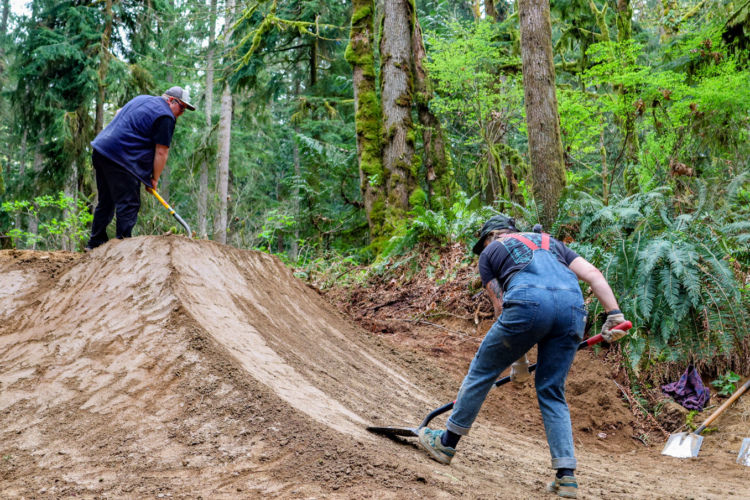
We’ve seen a recent surge of interest in trail building here on Singletracks and we just started a new forum for discussions about building mountain bike trails. But building the trail is only half of the equation; maintaining the trails is a long-term task that will never completely go away.

I’ve been dedicating more of my time lately to volunteering during trail work parties at my local trails. This blog post tells the story of our most recent work party, but also explains the why and the how behind basic trail maintenance.

De-berming and Nicking

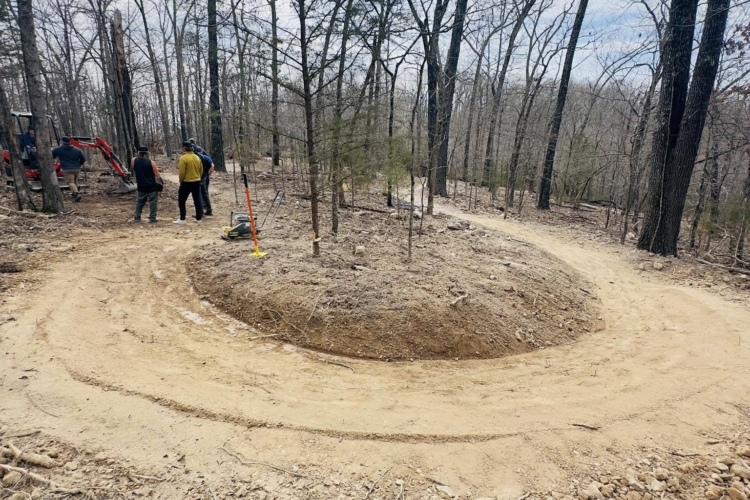
We spent four hours on a Saturday morning (1/7/12) working on de-berming and nicking the Jake-to-Bull connector trail out at Bull Mountain which runs from the lower Jake Mountain parking lot to the upper Bull Mountain lot. Our main focus was the first section, which drops down from the Jake Mountain lot to USFS road 28-1. In my opinion, the entire Jake-to-Bull connector is (or was) one of the worst-draining sections of trail in the entire trail system, so our focus here was well-deserved, and really, long overdue!

The basic design premise behind a bench-cut singletrack trail is that you want the water to flow off the trail/across the trail instead of following the trail down the mountain. There are various techniques you can use to make this happen, but the most important is to make sure that the trail is out-sloped.

Due to heavy use (or a haphazard initial build), the center of this trail tends to pack down more than the outside, creating an outer berm that holds the water on the trail. Our job was to de-berm the worst sections of the trail and to “nick” the low points by building drainage channels off of the side so that the lowest spots at the bottom and tops of the hills can drain properly.

De-bermed section of trail.

The tools of choice for this work are a pulaski and a McLeod. The pulaski is used for the main grunt work of chipping down the hardened outer berm and digging the nick in. But a pulaski isn’t capable of finishing the job. After the main digging is done, the McLeod comes out and is used to pull all the loosened dirt and other debris downhill, away from the trail. Generally, after pulling the loosened dirt away we’ll notice that the outer berm is still somewhat present, and then it’s back to the pulaski.

Pulaski, foreground. McLeod, background.

It can take a lot of switching back and forth between tools or people and a lot of time to satisfactorily de-berm and nick a low spot in the trail. Of course, you can do a quick once over… but if you don’t put in adequate time to do the job properly, it will either not make any difference at all, or the small drainages that you’ve made will fill right up in a few months. The best plan: do it right the first time so you won’t have to be back for another decade or so!

De-berming of a low spot, before and after:

Note: the low spot pictured above was rather minor compared to some of the muck holes we tackled that day!

The final test to determine whether or not the de-berming or nick will succeed at diverting the water off the trail requires a very specialized tool: a soccer ball.

Yes, a soccer ball. The ball is rolled down the trail and supposedly simulates the action of water with relative accuracy. If the ball rolls off the trail at your newly constructed nick or newly removed berm, then good: mission accomplished! If not, it’s back to the pulaski until it does.

Dave Muse testing the trail with the soccer ball.

Get Involved

With these trail design philosophies, tools, and techniques at your disposal, you are ready to start giving your trails the TLC they deserve! Before you head out and start moving dirt, though, make sure you have permission to perform the maintenance, and make sure you are working in line with the general philosophy of the trail system. For instance, out here in the National Forest we aren’t allowed to just go out and put tools to trail old day we please. We have to arrange pre-scheduled work days, document all the hours we work, sign waivers, and follow quirky safety procedures such as wearing helmets while we dig.

If you are interested in helping maintain your local trails, one of the best things you can do is become a member of your local trail advocacy group (check out this list of mountain bike clubs and organizations). They will probably have tools you can use, instruction and guidance on where and how to maintain the trails, and it’s a great way to meet like-minded riders, too! And if you aren’t convinced that you should help out yet, here are 7 Reasons to Start Doing Trail Work.
Get Digging!

Your turn: Are you involved in maintaining your local mountain bike trails?

How-to: Mountain Bike Cabling

January 23rd, 2012

Installing or replacing the cables on your mountain bike can do wonders to improve shifting performance on the trail and you might be surprised just how easy it is to do yourself. This article will focus mainly on derailleur cabling but many of the concepts are transferable to mechanical brakes (disc and V-brakes) for those who haven’t upgraded to hydros yet.

We’ll start with this short tool and material list:

  • Cable/housing cutting tool
  • Allen wrenches
  • Pliers
  • Cables and housing

Cable and housing cutting tool.

That’s it! The only tool you may not have already is the cable cutting tool and unfortunately it’s necessary – most general purpose tools won’t cut it for this job (ha!).

Choosing cables and housing

Jagwire, Gore, Shimano, and SRAM sell cable and housing kits at various price points depending on the quality of the product. In general, you get what you pay for so if you want the best cables, buy the most expensive set. That being said, performance benefits are diminishing as you move up the cost-ladder so I usually pick the middle-of-the-road cable and housing kit (around $25) to get the most bang for my buck. Note that some kits may be specifically designated as brake or derailleur cable kits so make sure you know what you’re getting. Also, most kits will include enough cable and housing for front and rear so you just need one kit for your derailleurs and one for your brakes.

If you’re only replacing a single cable or a busted housing, you don’t need a full kit and most manufacturers also sell cables, housing, and parts separately. But for a complete overhaul or new install, go with the kit because it’s cheaper than buying the parts and it’ll include all the little pieces you’ll need for a smooth installation.

Installation

Start at the shifter (or brake lever) and carefully take the unit apart. The tops on most SRAM shifters unscrew without a tool – just use your thumbnail and twist. Make a careful note of how the cable is routed inside the shifter – once you take the old cable out you’ll need to route the new cable in the same way. New shifters often come with the cable pre-installed.

The “barrel” end of a shifter cable.

Bike cables usually come with two metal ends attached – a disc on one end and a barrel on the other. In general, the disc end is needed for a brake cable install while the “ball” end is used for shifter installation. Since we’re installing derailleur cables here, cut off the disc end using your fancy cable cutters.  Bike cables are actually made up of bundles of many tiny cables so you want to make sure you get a clean cut and avoid fraying the bunch – hence the need for a sharp, special cable cutting tool for the job. A frayed cable end will be nearly impossible to thread through your shifter and cable housing and once a cable starts to fray, it’s usually worthless.

Holding the cut end of the cable, thread the cable through the shifter according to the instructions that came with your shifter unit. Now relax – that’s often the hardest part of the operation!

If you’re replacing the cables on your bike, now is the time to round up the old cable housing pieces so you can cut the new cable housing to the same lengths. For a new install, start with the first section – from shifter to frame – and hold the housing between the shifter and first cable stop. Rotate your handlebars far left and far right to make sure you have enough slack for a full turning radius. Mark the spot with your finger, then make a clean cut using your tool, being careful not to crush the housing as you cut. Place ferrules on both ends of the housing, then route the cable through the housing, taking care to avoid fraying the cable. A good rule of thumb: if you feel resistance when pushing the cable through, back off and try again. If you force the cable, you’ll fray it. Sometimes twisting the cable inside the housing can overcome a slight resistance (just be sure to twist with the cable braid rather than against it).

Slip the ends of the housing into the shifter and frame stops and admire your work! For the rear derailleur you’ll need to repeat this procedure twice more, fitting the housing between cable stops on your frame. If you have a full suspension bike, be sure to leave some slack in the cable and housing in the transition between the main and rear triangles to account for travel.

If you’re installing a brake cable or if your frame uses cable guides instead of cable stops in places, just run the cable and housing continuously and use zip ties to attach the housing to the frame. Tighten the zip ties all the way down and cut off the excess as close to the guide as possible. You can also use C-clips designed specifically for attaching housing to your cable guides.

At the derailleur end, attach the cable to the anchor bolt and tune your derailleur. For the front derailleur, you may want to first add a cable “boot” for additional protection – most kits will include this and the boot will slide over the cable just like the housing. Once you have things pretty well dialed, cut off the excess cable and place an end cap over the cut end. Crimp the end cap down using your cable cutter (if it has a crimper) or use a pair of pliers. This will prevent the cable from fraying over time.

Cabling tips and tricks

Cable rub can be a problem on some bikes, particularly if you have excess housing length in certain places. On our New Year’s ride, ckdake pointed out evidence of cable rub on my new bike – and this was just the second ride! His suggestion: electrical tape on the frame between the frame and the housing. This worked great for me and since my frame is black, it’s hardly even noticeable.

Sheldon Brown mentions using a rosin-core solder on the ends of cut cables to prevent fraying and also a few lubrication strategies for keeping things rust-free and smooth shifting. Modern coated cables may not need lubrication so check the instructions that come with your your cable kit.

Properly installed, your cables and housing should last for years with little to no maintenance. But if you’re experiencing shifting problems or notice cracked housing and frayed cables, it may just be time for a simple cable overhaul.

Cinema Sunday: “The Whole Enchilada”

January 22nd, 2012

I have heard tales of an incredible ride in Moab by the name of “The Whole Enchilada,” but I haven’t truly been able to grasp its epicness… until now.

The Whole Enchilada drops over 7,000 vertical feet from Burro Pass down to the town of Moab, Utah over the course of 26 glorious miles.

This nicely-edited helmet cam video gives you a feel for the entire descent, but trims it down to just the best 11 minutes. Sit back and enjoy, and start dreaming about a Moab trip now!

7 Winter MTB Photos
January 21st, 2012

This past week we featured winter mountain biking photos as a nod to those who keep the pedals turning through the coldest temps, the darkest days, and the deepest snows. Hats off to all of you, the hardcore, who never stop spinning!

“Triple D (Second Place 2011).” Photo: FloridaSnowman.

“December 31 and the sun sets on the last ride of 2011.” Trail: Discovery Hill, Idaho. Photo: chukt.

Photo: Durango Devo.

Mendenhal Glacier. Photo: Klister.

Photo: michaelkll.

Photo: element22.

Steve Meurett on his new Salsa Mukluk 2 at Levis Mound, WI. Photo: Steve Meurett.

Your Turn: What was your favorite photo from this week?

100 Days to the Cohutta 100 Mountain Bike Race

January 20th, 2012

Ok, so I may have been a little over-ambitious in my New Year’s resolutions this year. Earlier this month I signed up to complete my first 100-mile mountain bike ride, the Cohutta 100 in Tennessee on April 28. It’s 100 days to race day and I’m starting to wonder what I’ve gotten myself into.

The Cohutta 100 is the opener in the annual National Ultra Endurance (NUE) Series so all the best endurance athletes from around the US will be there to kick off the season. As far as 100-mile mountain bike race courses go, the Cohutta is said to be a relatively good one for first-timers with a low singletrack-to-fire-road ratio. Still, the route climbs a total of 14,000 feet and crosses the state line into Georgia and back.

Tanasi Trail System. Photo: ositoking.

At the northern end, the race starts at the Brush Creek and Tanasi trail systems, located near the Ocoee Whitewater Center before heading south on forest roads through the Cohutta Wilderness area. At the southern end, this year’s course will include sections of the Pinhoti trail for the first time, adding another fun and well known singletrack trail to the mix. The race returns to Tennessee via the same forest roads with a downhill singletrack finish on the well-known Thunder Rock trail.

Training for the race

Completing a dirty century mountain bike race has always been on my to-do list and in 2008 I completed the Sumter Dirty Metric Century in South Carolina. That race was 100K which works out to 62.1 miles – nearly 40 miles short of 100. To be honest, I barely survived that race and at that time I couldn’t imagine going for 100 miles. Apparently time dulls painful memories. :)

But here I am – it’s 2012 and I’m committed, having already plunked down my $135 race registration fee. Doing the math, if I average 10mph during the race – which is aggressive – I’ll be on the bike for 10 hours. That’s four hours longer than the longest ride I’ve done so clearly I’m going to need to do some training.

The Bear Creek Overlook on the Georgia side of the Cohutta 100 course.

Unfortunately there aren’t a lot of (free) 100-mile mountain bike race training plans to skim online (one Google search I did brought up my own article about training for the Sumter Metric Century). I did find several 100-mile road cycling training plans but they all seemed way too wimpy (example: a 10-week plan that starts with a 25-mile “long” road ride). From the short paid plan excerpts I read online, a 100-mile mountain bike training plan should be at least 12-weeks long and will start off with a 4-hour “long” ride (35-40 miles for me).

So I built my own training plan. I won’t share the details of that plan until I complete the race (and know for sure the plan works!) but here’s the jist of it: progressively longer rides (distance but more importantly time) each weekend and 1-2 solid rides (20+ miles) during the week. I’ll use my road bike for about a third to a half of my training rides mainly because road biking offers a more consistent aerobic workout than the heart rate spikes you get from mountain biking. Plus road biking usually takes less time since I can start and end my rides at the house instead of driving to a trailhead.

Nutrition will play a key role in my success (or failure) during the race and in training so my plan includes finding the best things to eat during the ride. Think about it: in 10 hours time, even if you’re not exercising, you’ll eat 3 meals. Now add in the calories you’re burning on the bike and you need a ton of fuel to keep going. Eating regularly and often during my long rides will be key.

Although it’s 100 days until the race, my training plan doesn’t officially kick off until February 11, 12-weeks to race day. Even so, I’ve already started building my base with several 35-mile road rides and 25-mile mountain bike rides under my belt.

Training for a 100-mile mountain bike race promises to be a huge time commitment and mentally I know it’ll be tough to get out for long rides this winter. Still, riding my mountain bike 100 miles is something I’ve always wanted to do and there’s no better time than now to saddle up and do it!

Over the next 100 days I’ll be writing about my training progress which should help keep me motivated and accountable. Just one hundred days until I cross that finish line!

How to Create GPS Trail Logs With A Smartphone

January 19th, 2012

Logging GPS tracks of your rides can be fun and informative. You can compare your times from previous rides, use the data to make full-blown maps for yourself or others, and you can even use those maps to earn a free, lifetime pro membership here at Singletracks!

Just a couple of years ago, tracking your ride required a dedicated GPS device, some retail or other proprietary software on your PC, and usually a paid membership to some website to upload all the tracks to. The evolution of GPS-enabled smartphones has changed all of that for the casual user. There are still excellent dedicated units on the market, and they usually come with bundled software and special websites, but for this article, we will focus instead on doing it for free with the smartphone you already have and some free software tools. Please note, this is about creating logs of your rides, NOT navigating via pre-existing GPS data. I will cover that in another article.

This article assumes you have access to a smartphone with built-in GPS. The first step will be to select an app to log your GPS position to a file every few seconds while you ride.

Android

For Android phones, MyTracks is a free app that works with your phone’s internal GPS to generate a track of your trip which can then be exported as a GPX, KML, TCX or CSV file (more on these formats in a bit.) In addition to GPS data tracking and display, if your phone happens to be ANT+ compatible, MyTracks can also interface with a Polar heart rate monitor or SRM power meter. This basically turns your phone into a Garmin Edge 800!

I have played with this app a little on my wife’s Evo 4G and it is fairly straightforward to use and seems to be accurate. Tracks are exported to the SD card, or can be uploaded to Google Maps, Facebook or Twitter. There is not an export via email feature.

iPhone

iPhone users also have a number of free and paid apps for GPS. GPS Tuner was reviewed by trek7k here on the blog, and it comes in a free ‘lite’ version, or you can gain access to the full feature set for $6.99. The lite version supports saving and exporting GPX tracks as per this post. You can read trek7k’s review of the full version here.

Blackberry

For my Blackberry I use and highly recommend the shareware app GPSLogger II. This app can log your progress at a set time interval and can be set to log track points at or above a preset speed (so that it doesn’t log your bathroom or snack breaks.) In addition to the basic logging functions, it also has a track-back feature to retrace your steps, a multi-panel display to show various stats while you ride, a ‘bike computer’ display mode, an audible alert for pre-defined distance markers, and an emergency alert mode if you stop moving for a set amount of time (that last feature requires cell service.)

Working With The Track Data

Okay, you’ve downloaded a GPS app to your smartphone, you’ve been on a ride and captured a track. … Now what?

First, about those file types…

The ‘standard’ format for GPS data files is .gpx, which is a form of XML. You can open one of these files in Wordpad to get an idea of how they work. TCX is a proprietary format created by Garmin. For regular old GPS data it is not needed, but if you also track heart rate data during your ride you will need this format. KML is a format specific to Google Earth. CSV is the same XML format as GPX, but formatted to open in a spreadsheet. GPX is the common denominator that works in all scenarios, so we’ll stick with that for the purposes of this post.

Using whatever method is appropriate to your phone, get the .gpx file to your computer. If you need to edit out any extraneous data from wandering around the parking lot, or even from the drive home, you can do so quickly and easily with a program called GPX Editor. Open the program, browse to and open your .gpx file, and it will be displayed graphically. You can then select and delete sections or segments, and save the trimmed version for uploading.

The next step is to find a place to upload the file.

First, there are a number of trails here on Singletracks.com that are lacking solid map data. If you record and upload three new or updated tracks, you will earn a free lifetime Pro membership to Singletracks.com. How cool is that! To upload here, look up the trail page for which you have GPS data. Under the ‘Dashboard’ section in the upper right, click the Add GPS Data link. Browse to the .gpx file on your hard drive, write a brief description and then click ‘Finish’ The submitted data will be reviewed and added to the map page for that trail.

Several websites allow for uploading and long-term tracking of your ride data. I have tried a bunch and have settled on Strava.com. The site allows you to upload and store your GPS tracks and then easily view charts and stats over the course of a number of rides, a specific time frame, etc. You can even tag rides to a specific bike and view stats per bike. (Handy for us reviewers.)

My second favorite site is Trimble Outdoors. Two of my favorite features on their site are the ability to ‘draw’ missing or extra sections by hand, for example if your GPS device misses a section, and the ability to embed geo-tagged photos. The latter is handy for creating a trail guide with pics of major intersections like this.

And finally, there is GPS App (beta) from the creators of Singletracks.com. GPS App has basic track management features, and also allows online editing of your track without the need for a standalone program.

Speaking of using your GPS data for geotagging photos, if your digital camera includes EXIF data in the digital image files (most do) then you can ‘geotag’ your photo by adding the GPS coordinates of each photo to the EXIF data. There is a free program for this called GPS Correlate. It comes in both Windows and Linux versions and I have used it pretty extensively. It works by loading up a .gpx file and a folder of digital pictures. It reads the timestamps of the photos and matches them up with corresponding track points on your GPX track. Once a match is made, the GPS coordinates are written permanently to the digital picture file. Sites like Flickr and Trimble Outdoors can understand this EXIF data, including the Geotag, and use it to place your pics on a map.

This is a lot of technical info, so here is a summary of the steps we’ve covered:

  1. It’s assumed that you have a smartphone with built-in GPS.
  2. Grab an app for your particular phone and spend a few minutes familiarizing yourself with the basic operation.
  3. Bring your phone, start the GPS logger app and go for a ride. Don’t forget to stop logging when you finish!
  4. Export the resulting .gpx data file to your PC via USB or email.
  5. If needed, edit your file with GPX Editor or GPS App.
  6. Upload your file to Singletracks, Strava, Trimble Outdoors, or open it in Google Earth.
  7. Enjoy looking at your ride all mapped out, and check out your stats such as climbing, average speed, etc.
  8. Optionally, Geotag the photos you took along the way.
If you’re a data geek, or if you want to work toward a free Singletracks.com membership, this should be everything you need to get the data out of your smartphone and put it to work!

Advocacy Alert: Three GA State Parks to Target Mountain Bikers with a Trail Fee

January 18th, 2012

The Georgia Department of Natural Resources (GaDNR) is currently proposing a new fee to ride mountain bikes on trails in three state parks: Unicoi, Fort Yargo, and Hard Labor Creek (which will have brand new mountain biking trails opening in the next few months).  Fort Mountain State Park has had a trail fee in place for several years, and it will remain.  Area riders are up in arms over the new fee, but not because of the money.  In discussing the issue I’m going to focus mostly on Fort Yargo, because it’s the most popular of the three for mountain bikers.

I’ve spoken with several people involved in this issue trying to see all the different sides: Tim Banks, the Assistant Chief of Operations for GaDNR; Robin Allen, Communication Director for Southern Off Road Bicycle Association (SORBA); and Tim Schroer, owner of Dirty Spokes Productions who promotes mountain bike races, duathlons, XTERRA triathlons, and trail running races all across north Georgia, including Fort Yargo.

The Proposal

If the proposed system is put in place, it will require riders to check in at park offices before they ride.  They will fill out a form and pay a $2 per rider fee and be given a placard or something similar to attach to their bike or carry with them as proof they paid the fee.  This new fee will be in addition to the current $5 per vehicle parking fee.  An annual trail pass can be purchased for $25, and the annual parking pass cost will remain unchanged at $50.

Why Riders Are Angry

What I didn’t mention above is that ONLY mountain bikers have to pay the $2 trail fee.  Hikers and runners can use the trails without the fee (though they still have to pay for parking).  This is the main reason many mountain bikers are angry – for being singled out.  Further, the trails at Fort Yargo were built and maintained almost exclusively by volunteer mountain bikers from the Yargo Area Biking Association (YABA) with very little cost to the State.  I haven’t been able to find the exact numbers regarding just how much the State actually paid for the construction of the trails but I would imagine the trail has more than paid for itself thanks to the crowds of people it brings to the park.  Last year the Athens Banner-Herald reported that the park had over 400,000 visitors and an economic impact of more than $24 million on the local area.  Before the trails were built it was one of the least visited of all the State Parks.


Volunteers have built some super fun trails in Fort Yargo State Park.  Photo: Athurber

Mr. Banks pointed out that mountain bikers are one of the last user groups to be charged for activities in State Parks.  Horseback riding, disc golf, swimming pools, and boat rental users have been charged fees for years.  While mountain biking doesn’t use facilities that the State maintains (such as boat rentals for example), riders do enjoy other amenities in the parks that cost the park money to build and maintain such as picnic tables, paved parking, shelters, bathrooms, water, etc.  I would argue that our parking fee would cover the minimal maintenance costs of those facilities, no?

When asked why hikers and runners wouldn’t be charged to use the same trails, Mr. Banks told me they believe that certain basic activities in State Parks should be free, and walking is really as basic as it gets.  I totally agree.  But, we’re using the same exact facilities, and it simply isn’t right to charge one group and not another.

Another reason riders are angry about the fee is because the money will not necessarily go directly back to the trails. For that matter, the money might not even stay in the park where it’s collected, instead going into the general park system fund.  Mr. Banks explained to me, however, this is how ALL fees are handled, so it’s not like they’re only using bikers’ fees to fund other activities.

Many riders feel so strongly that the fee is unfair and “punishment for success,” as one person put it, they are threatening to stop riding at the parks, and not renewing their annual parking passes.  There is also the worry that the fee will alienate volunteers who have spent years working on these trails, so much so that they just stop working on them.  Many of them see this as a stab in the back.  There is also a fear of the negative economic impact this fee could have on the areas surrounding the parks if riders do indeed stop riding there.


The trails in Unicoi State Park are part of mountain biking history: they played host to the NORBA Nationals in the mid ’90s and the current Georgia State Championship series often uses Unicoi for its season finale race.  Photo: mtbgreg1

Why a New Fee?

Because the parks need money, that’s why.  Since 2008 state appropriation funding to the park system has been cut by 46%.  Despite the cuts, GaDNR has been able to keep all GA State Parks open.  But, if they want to keep them open, more money has to be raised. Mr. Banks said they estimate the fee will bring in an additional $2,500 the first year from Fort Yargo.  This doesn’t seem like much money to me.  I asked why not simply raise the parking fee?  Well, they did that just a few years ago, and they try not to raise it too often.  It had been unchanged for about 7 years before the most recent increase.

Volunteer Rewards Program

The parks had several town hall type meetings recently regarding the new fees and many riders showed up and voiced their concern.  One of the results of those meetings is a volunteer rewards program.  Anyone who volunteers 20hrs of trail work will receive a free annual trail pass for their entire family.  This is a win-win: it rewards volunteers, and it will help attract more volunteers.  The parks will also be awarding honorary lifetime trail passes to people who were instrumental in building and maintaining the trails.


Brothers Steve and Randy Gordon founded the Yargo Area Biking Association and have been working on the trails there for years.  Photo: YABA

What About Racing?

Races at the parks draw big crowds, bringing lots of people into the park and surrounding areas who wouldn’t otherwise have been there – their economic impact shouldn’t be taken lightly.  The Dirty Spokes race I did at Fort Yargo last year had over 400 racers, and it seems to grow every year.  A lot of riders wondered how, and if, the new fee would change the race – would racers still have to check in and pay the $2 fee?  Will it cause the race entry fees to go up?  I asked Tim Schroer about how the new fees will affect the races and here’s his response:

I don’t know how it will effect races at the parks but hope people see and understand we have a great situation here in Georgia with some outstanding state parks.  The facilities at each of the parks here in Georgia are very well maintained / grounds well manicured and looked after (I believe the daily user fees in California are about $12 and the way our parks are maintained are so much better than the ones we visited this past year in California).

It is my understanding the additional fees will not apply to the events or participants in the events (but have not had a formal conversation about it / however our contracts are in and signed for 2012 and they do not reflect the new fees).  If there is an additional charge in years to come we will absorb the costs (we are in our 7th year of putting on these events and have never raised our prices.)


I had an awesome time racing at Fort Yargo last year.

SORBA’s Stance

When I spoke with Robin Allen it was clear that SORBA is taking the long view on this – how can it be used to improve mountain biking in Georgia?  The issue has (hopefully) opened a dialog between GaDNR and SORBA.  Robin said they’re trying to show the state just how awesome mountain biking can be for the park system.  If the success at Fort Yargo could be duplicated in other parks it would only be a good thing for everyone: the parks, riders, and communities around the parks.  SORBA had staff members (and plenty of local chapter members as well) at each of the meetings regarding the fee and they pushed for a fair solution, and especially something that rewards volunteers.  The parks listened (somewhat at least) and will be implementing the volunteer rewards program I discussed above.

What is the Answer?

There’s no getting around the fact that the parks need money to stay open. I understand that, as do most other riders.  Like I said, the money isn’t why riders are angry.  It’s the principal of the matter.  They’re angry because they’re being singled out.  They’re especially angry since they’re being singled out to use facilities they built and maintain for the park which have greatly benefited the park via increased visitors and parking fee revenue.  No good deed goes unpunished as they say.

Now, I don’t think the answer is to apply the trail fee to everyone.  Sorry, but I can’t stand behind charging someone to walk in a State Park.  In my opinion, there shouldn’t be a trail fee, period.  The only fair solution in my mind is to raise the parking fee.  This is completely fair since everyone would have to pay it, not just one user group.  And it would raise much more money than charging mountain bikers to ride.

If the park system would work with riders we could be a huge asset to them.  We’ll help secure funding to get new trails built, and we’ll swing the tools to build them as well.  We’ll maintain them for free.  Those trails bring a new group of people into the park that otherwise wouldn’t have come.  Races will help draw even more people into the park.  We don’t just come to the park with bikes and riding gear – we come with money to spend in the surrounding communities.  We camp, stay at hotels, buy gas, eat at local restaurants, and shop at local stores.  But by discriminating against mountain bikers by charging riders, and only riders, a fee to use multi-use trails, the parks would be biting the hand that feeds them.  Many riders will simply ride someplace else, where their volunteer work isn’t rewarded with a fee targeted only at them.   There are 172 trails listed in the Singletracks trail database for Georgia - riders have lots of choices.

Got An Opinion?

GaDNR is accepting comments on the new fee until Jan 20th (Friday).  If you would like to submit comments send them to Director.GSPHS@dnr.state.ga.us

Also, as always, use the comments section here on the blog to tell us what you think.

I’d like to thank Tim Banks, Robin Allen, and Tim Schroer for taking the time to answer my multiple e-mails, phone calls, and text messages.

Trail Tuesday: IMBA Ride Centers

January 17th, 2012

Years ago, IMBA’s only designation for truly excellent singletrack was the term “Epic.” Over the last several years that has slowly been changing, with new designations including “Gateway Trails,” “Flow Trails,” and “Ride Centers” being added to the vocabulary.

“Ride Centers” are areas that are truly mountain biking destinations in every sense of the word. The best ride centers have trails of all difficulties ranging from beginner to expert. They also include trails for all disciplines of mountain biking, from cross country to downhill and everything in between. Not only do they have great trails, but these areas provide great lodging, great restaurants, and great places to buy a drink.

IMBA has currently designated only seven locations as true “Ride Centers,” and even those are broken down into three categories: Gold, Silver, and Bronze. Here they are in descending order:

Park City, Utah (Gold)

Round Valley Trail. Photo: pdw02.

As IMBA’s only Gold-level ride center, Park City embodies every single one of the factors that I mentioned above. It has miles and miles of pristine singletrack with gorgeous Rocky Mountain views, trails ranging in difficulty from easy to hard, trails for all different types of riders, and plenty of facilities to support the droves of people that travel from out of town.

Trailside Loop and Skills Park. Photo: gab26.

According to IMBA Regional Director Ryan Schutz, “what’s really important is that [the trails] function as a cohesive network, with signage and trail connections that create a model riding area.”

Round Valley Trail. Photo: pdw02.

Oakridge Area, Oregon (Silver)

Alpine Trail. Photo: tumbleweed14.

The communities of Oakridge and Westfir have poured considerable resources into transforming their economies from ones driven by timber to economies driven by tourism–and mountain biking plays a big part of it. With everything from close-to-town loops to all-day epics, Oakridge is sure to please both the beginners and the veteran rippers with 500+ miles of singletrack.

Middle Fork Trail. Photo: AK_Dan.

Copper Harbor, Michigan (Bronze)

Photo: ukraine.

Located at the tip of the Keweenaw peninsula above the Upper Peninsula of Michigan, Copper Harbor is about as remote as you can get, making this a true “destination” trip. Copper Harbor is home to an ever-expanding network of trails ranging in difficulty from beginner to expert. Surprisingly, many of the trails are designed as gravity-fueled freeride trails with plenty of berms, jumps, and gnar to keep most any freerider grinning from ear to ear! Shuttles run during peak times, but if you have the legs and the bike for it, you can earn your turns as well.

Cuyuna Lakes, Minnesota (Bronze)

Photo: RoadWarrior.

Cuyuna Lakes just held their grand opening this summer, but the brand-new purpose-built trail system is already a “Midwest Mecca.” Mountain bike legend Hans Rey, after sampling the trails on opening day, said, “They’re among the best I have ridden — super flowy and fun.” Coming from Rey, that’s a real compliment! The trails currently include fast, flowy sections, challenging slow-speed technical sections, and everything in between. Cuyuna Lakes is also exploring the possibilities for challenging downhill-esque descents. It will be interesting to see what the future holds for this new destination!

Harrisonburg, Virginia (Bronze)

Photo: RoadWarrior.

Harrisonburg, located in the beautiful Shenandoah valley, has a wealth of characteristically gnarly East Coast singletrack, with a few sections of beginner-friendly trail thrown in here and there. The community features excellent in-town singletrack, with several certified Epics just outside of town. The racing scene is alive and well in Harrisonburg, with local races of various distances all the way up to the Shenandoah 100, part of the NUE series.

Santos, Florida (Bronze)

Photo: trek7k.

The fact that a trail system in Florida has made it onto such a short list of world-wide ride centers speaks volumes of the quality of the riding at Santos. Santos features everything from groomed to rowdy cross country singletrack and from technical stunts to a progressive freeride/jump area, as well as the opportunity to get some serious air in the Vortex! Factor in nearby camping, bike shops, several popular festivals and races, and a thriving year-round mountain bike scene, and you have a true mountain biking destination… in Florida!

Singltrek pod Smrkem, Czech Republic/Poland (Bronze)

Photo credit: http://www.singltrekpodsmrkem.cz

According to IMBA, this “is the first purpose-built mountain bicycle trail system in continental Europe.” Translated as “Singletrack Under the Spruce,” this trail system follows the border of the Czech Republic and Poland and features 40 miles of pristine singletrack. In a place where people are accustomed to riding fire roads and old hiking trails, Singletrack Under the Spruce is a radical departure from the norm, and a breath of fresh air. Taking after popular facilities in the United Kingdom, the trailhead “boasts a comprehensive. . .facility that includes a bike shop, rentals, café, bike wash, showers and changing rooms — all situated above a gorgeous lake.”

More information about Singletrack Under the Spurce is available on their website.

Your turn: Which factors do you think are most important in a mountain bike destination? Is it just about having miles and miles of trails, or does a real mecca need to have more?

Santa Cruz Tallboy (Carbon) 29er Mountain Bike Build

January 16th, 2012

After testing six different full suspension 29ers at Interbike last year, I decided it was finally time to get one for myself. I’ve owned several hardtail mountain bikes since 1992, including a 29er, but this would be my first big move into full suspension mountain biking. Turns out it would also be my first carbon mountain bike.

The Santa Cruz Tallboy was the first bike I demoed at Interbike in September and it was love at first ride. I’m told this is Santa Cruz’s best selling mountain bike which says a lot since the company makes a bunch of great bikes (including the sexy V-10 Syd recently built up). And just in case you’re wondering, Santa Cruz didn’t give us these bikes – we both paid for ‘em with our hard-earned money.

Anyway, back to my Tallboy build. I decided to go with the carbon frame and Fox RP23 shock with Kashima coat (you can get the RP2 instead to save a little $$). Santa Cruz included a Fox shock pump and grease gun for the pivots but other than that, what I got was basically a blank canvas.

Initially, the biggest challenge was finding a headset that would work with the frame. Santa Cruz says this on their website: “As all of us frame manufacturers seem to be using slightly different configurations with tapered headtubes, these headsets are custom items.” Of course I read this after the purchased frame was sitting in my office, wondering what I had gotten myself into. The note from Santa Cruz made cryptic references to Cane Creek and Chris King headsets but didn’t give any specifics so I spent the next several days emailing Santa Cruz support and searching online for the right part.

Eventually Syd set me straight and before I knew it, I had the right Cane Creek upper and lower cups and a sweet Fox 32 Factory series fork with matching Kashima coat. I had the guys at Bicycle South install the headset and fork, then set out to build up the rest of the bike myself.

Ok so first, a bit about me: I am not Syd. I generally don’t enjoy working on bikes or researching parts and just when I *think* I know what I’m doing, I usually screw something up. Still, I figured building up a new bike would be a great opportunity to improve my wrench skills. And if I did make a mistake or get stuck, I could always bring the bike to the shop to have it put together the right way.

I started with the seat and seatpost, mainly so I’d have a way to hold the frame in my work stand. I found an old Easton EA70 30.9mm seatpost that came with mudhunny’s Blur and slapped a Titec Hellbent saddle on (the lightest one I could find in my collection). I was really anxious to get the thing looking like a bike so I grabbed my SunRingle Black Flag 29er wheels, strapped on a SRAM 2×10 cassette, and bolted on the rotors. The wheels were already shod with tubed tires even though the rims are tubeless but swapping those out is another project for another time.

After restoring my Redline to its original 1×9 configuration, I cleaned all my SRAM 2×10 X0 drivetrain stuff with a fine-tooth comb (and a ton of de-greaser). The bottom bracket and crank went on teflon-smooth and I finally figured out what that weird plastic piece on my bottom bracket tool is for (it tightens the retention nut on the crank arm). I attached the derailleurs, and was pretty happy with myself for actually buying the right front derailleur for my frame (it’s a high mount, dual pull, 34.9mm clamp, 2×10, in case you’re wondering).

Next I turned my attention to the cockpit. Not wanting to marginalize my Redline any further, I decided to use the alloy Syncros bars on my shelf instead of stealing the carbon Answer bars from that bike. I picked up a cheap 110mm FSA stem and Sette lock-on grips, then got busy attaching a new set of Avid Elixir 9 hydraulic disc brakes. I had planned on using a spare set of Hayes brakes but after looking at the brakes, they needed more work than I was willing to put into them at the time.

Finally, it was time to hook everything up and give the bike a spin! I wasn’t entirely sure how to route the derailleur and brake cables so I studied the Tallboy pics on the Santa Cruz website, making generous use of the zoom button to see the details. I used a fresh Jagwire cable kit, cut all the housing to size, and routed the cables. I ended up cutting one section of housing too short and fraying the rear derailleur cable but luckily I had spares.

Confession: derailleur and chain adjustments frighten me. This was the part of the build I was dreading and I assumed I would need professional help at this point. I read the SRAM instructions carefully and checked the existing chain length from my Redline. Turns out it was spot on! After routing the chain and linking it together, I attached the derailleur cables, made a few adjustments, then breathed a sigh of relief. It was alive! Final weight: about 27 lbs. which I could easily see dropping close to 25 lbs. with a few part swaps.

Of course I wasn’t completely done – there were still lots of little items like clipping zip ties, adjusting lever angles, and dialing in the shocks. All told I probably put 3-4 hours into the build and ended up doing it all myself (save the fork and headset installation).

I took a short test ride around the block to make sure everything was set, then drove out to the Pinhoti trail for my first real ride. It was a great ride and the only issue I ran into was with my rear derailleur cable slipping loose (easy trail-side fix).

In the end I’m really glad I built this bike up myself from scratch. I definitely learned a lot and gained confidence in my wrench skills, not to mention I got a bike that fits me better than one with stock components might. I can’t wait to put a ton of miles on this bike in 2012 – look for a full review sometime in late spring!


Site Map | Advertise | Partners | Contact Us | Terms | Privacy
Campground Reviews | Hiking Trails | Trail Running | Skiing / Snow Sports | Mountain Biking
Copyright 2012 Blue Spruce Ventures LLC | Atlanta, GA
singletracks.com is yet another slick Review App