Backyard bikepark. Over at ihatebikes.net the author is busy working on a backyard bike park and apparently things are getting pretty serious. Phase II involved using a backhoe / excavator to sculpt a sweet pump track in the woods and we’re anxiously awaiting pics of the next phase. If you’re looking for a somewhat more manageable project for a smaller backyard space, check out this article we posted a couple years ago about building a portable teeter totter or this forum thread about building a backyard skinny. DIY!
Rio Olympics: Mountain biking? So apparently Rio doesn’t have an established mountain bike trail to use for the 2016 Olympics at the moment so they’ll be building a “temporary” trail. Having been to Rio I can tell you there is super gnarly terrain all around the city so it shouldn’t be too much trouble to create a world class route. Downhill as an Olympic sport in 2016? This would be the place to debut it!
In other Olympic news, remember how we told you last week that Trek was really anxious to get the Chicago Olympics and how they helped scout some of the cycling venues (including MTB)? Well, it turns out that may have been a small part of the city’s losing bid:
The IOC praised Chicago’s compact venue plans along the downtown waterfront, and minimum travel time for athletes, but noted that the equestrian, shooting, road cycling and mountain biking venues were relatively far away.
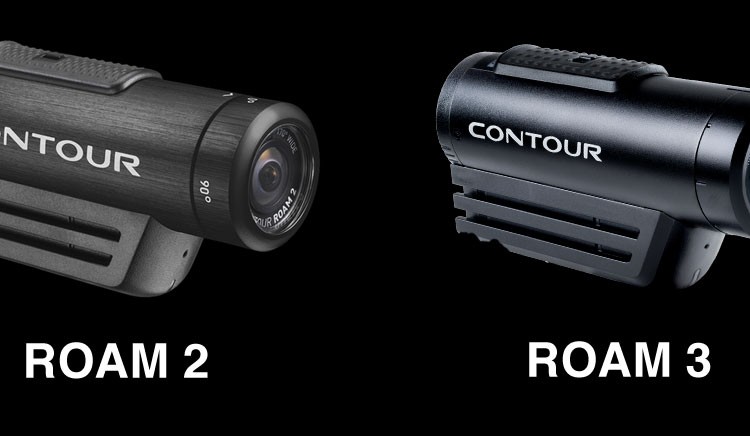
New full HD camera from VHoldR announced. If you read the blog you already know the VHoldR is an amazing helmet camera and now the guys are one-upping themselves with a new full HD (1080p) wearable camera. The new Contour HD 1080 helmet camera has 5 video modes from full 1080p HD to high speed SD and is aimed at the “pro” market - you know, badass mountain bikers and video producers. Don’t worry though, pro doesn’t mean it’s that much more expensive: the “regular” Contour HD price will drop to $279 and the new “pro” Contour will be just $329. Look for the camera in time for the holiday shopping season.
By the end of the contest, members linked 437 new trail videos to singletracks trail listings and added footage for more than 100 trails. The video tab on our trail pages is quickly becoming the most popular destination and with sweet HD video it’s no surprise
Thanks to VholdR for hooking it up on this contest! Stay tuned for more contests in September…
You know what they say: VOIDH (video or it didn’t happen). According to that logic most of us have never actually ridden a mountain bike but that can change with the VholdR ContourHD helmet camera. If you’ve been thinking about getting a helmet camera for mountain biking, this is the one to get.
First off, let’s talk video quality. The VholdR shoots in two modes: high def (720p HD) at 30 frames per second or standard definition (SD) at a scorching 60 frames per second. In HD mode you’ll get a wider shot and better detail while SD mode saves memory and is better at capturing fast motion shots. I found the color and lighting to be comparable between HD and SD modes and for most online video applications either one looks crisp and clear on screen. The camera automatically compensates for changing lighting conditions (moving from shade to sun, for example) and quickly adjusts the shot accordingly (though not instantly).
The VholdR makes use of a wide angle lens capable of capturing 135 degrees of action (90 degrees in SD mode). That translates into a field of view about halfway between staring straight ahead and full peripheral vision which means videos look realistic and don’t have the “tunnel vision” effect you may have noticed with other cameras.
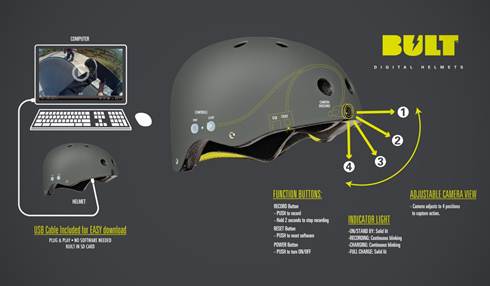
If you’ve used a helmet camera before you know that sighting the camera can be difficult, especially since most cameras are too small to include an LCD screen for previewing clips on the trail. VholdR takes a unique approach to this problem and includes “laser sighting” in the Contour HD. Press the power button and two lasers mounted beside the lens show you where the camera is aimed and how the shot is aligned horizontally. If you need to make adjustments the Contour HD lens rotates 90 degrees to the left or right and the camera orients the video automatically. The rotating lens enables you to mount this camera pretty much anywhere and at any angle!
Aside from video quality, the endless possibilities for mounting the Contour HD are what really make this camera shine. VholdR includes a “flat surface mount” and “goggle mount” with the Contour HD but if you want to rock the camera on your vented helmet you may want to invest in the optional “vented helmet mount” ($19.99). The flat surface mount uses a removable adhesive pad to stick to any flat surface (like a non-vented helmet or bike frame) but I found the goggle mount paired with a Simple Strap worked just fine for bike frame and helmet mounting.
After experimenting with multiple camera angles and mounting positions I found my favorite to be the steering tube mount. The Contour HD is lightweight - about 5 ounces with mounting hardware - but it still felt a little annoying on my helmet, especially on rocky trail sections. I assumed the helmet shots would be more stable than the bike mounted shots thanks to my neck acting as a shock absorber but that actually wasn’t the case. In both cases the shots came out smooth and with very little shaking (though mounting the camera on a FS bike works better than a hardtail). Even if your shots do end up a little bouncy (some of mine did because I didn’t clip the camera to the mount securely on one ride) you can use software like iMovie to stabilize clips in post-production.
In terms of on-trail operation, the VholdR couldn’t be easier to use. There are basically just two controls on the camera body: the power button and the record slider (the HD/SD mode button is concealed behind a sliding panel). Hold down the power button to turn the unit on and wait for the audible beep and green light to signal the camera is ready. Flip the slider into “record” and you’re on the air with virtually zero lag time. A red light on the front of the camera lets you and your on screen talent know you’re rolling - a nice feature that some other cams we’ve tested left out. The controls are large enough that you can work them with gloved hands and you can easily find them by feel when the camera is mounted in awkward positions (like on top of your head!).
The included rechargeable battery seems to last forever and unless you’re planning to record an entire epic ride you probably won’t bump into the 3 hour limit (you can buy extra batteries if you do). The included 2Gb MicroSD card holds 1 hour of HD video and 2 hours of SD action, though you can pop in cards up to 16Gb for a whopping 8 hour HD video capacity. Still not enough? Just pack extra memory cards and batteries and you can shoot for days! Some cameras we’ve used have problems with shaky battery connections that cause the camera to power down in the middle of a shot but the ContourHD was 100% reliable in our tests.
Audio is captured via an internal microphone and is encoded using AAC compression (the same format used by Apple’s iTunes music store). All the helmet cameras we’ve tested have problems with wind noise, especially bombing down fast trails, but the ContourHD does a good job filtering out the static. At moderate speeds voices were clear and audible while at high speeds the wind noise rarely overpowered the sounds of tires crunching dirt.
The ContourHD comes with simple software to import videos from your camera and upload them to vholdr.com where you can also view thousands of action sports videos. Editing tools are limited to clipping but the app makes it easy to tag and organize helmet cam footage on your Mac or PC. The ContourHD saves videos in Quicktime format (.mov) which makes it simple to import videos into other video editing programs like iMovie (my personal fave).
As you can probably tell I love this camera and it’s earned a permanent spot in my Camelbak whenever I go out for a ride. With incredible video quality, endless mounting possibilities, and dead simple controls, the VholdR ContourHD is the best helmet camera I’ve seen for mountain biking. For less than $300 you can pick one up at REI and start sharing your rides (and your sick moves!) with the world.
So this is pretty exciting: someone on singletracks is going to win a Contour HD Helmet Camera from VholdR at the end of the month. Take a moment to wipe the drool off your keyboard and keep reading…
Starting today we’ll be awarding points to members for linking MTB trail videos on VholdR.com to singletracks trail pages. We’ve set up a contest page showing the current standings where you can also read the rules and find out more.
If you’re not familiar with VholdR.com, it’s a video site with thousands of action sports videos posted by VholdR camera owners. The site is super slick and includes location data, comment features, and cool community features. Even if you don’t own a Contour HD (yet) you can still join and watch sweet vids.
Questions? Post ‘em here in the comments. Let the search for VholdR trail videos begin!
Lots of mountain biking news to share this morning.
Kona Naming Contest: A couple weeks ago we told you about the contest to name Kona’s new Magic Link all-mountain bike and one of our readers is a finalist in the contest! Denis suggested “Tanuki” which is “a Japanese raccoon like dog or badger with monster nuts” who, according to legend, is a master of shape shifting and disguise. Whatever, all we know is it sounds cool and we want to see Denis win. Head over to the Kona site and vote Tanuki up…
VHoldR Intros ContourHD Helmet Cam: The helmet cam market is heating up with the introduction of the world’s first HD helmet camera from VHoldR. The camera is said to capture 30 frames per second in full high-def quality or a rockin’ 60 frames per second in standard definition and sports a 135 degree wide angle lens to take in all the action. Pricing is reasonable too - just $299 - look for the Contour HD in stores and online starting next month!
Downhill Camp Held in Lousã, Portugal: This press release came to us in Portugese but the pictures speak a thousand (English) words. Ten riders attended the Team Berg Cycles camp April 8-11 and learned to tackle the toughest jumps and obstacles over dozens of downhill runs. My favorite part of the camp: the riders trained using spinning bikes (see photo below). Most cross country riders view downhillers as too lazy to ride uphill but this camp shows it takes endurance no matter which direction you ride.